
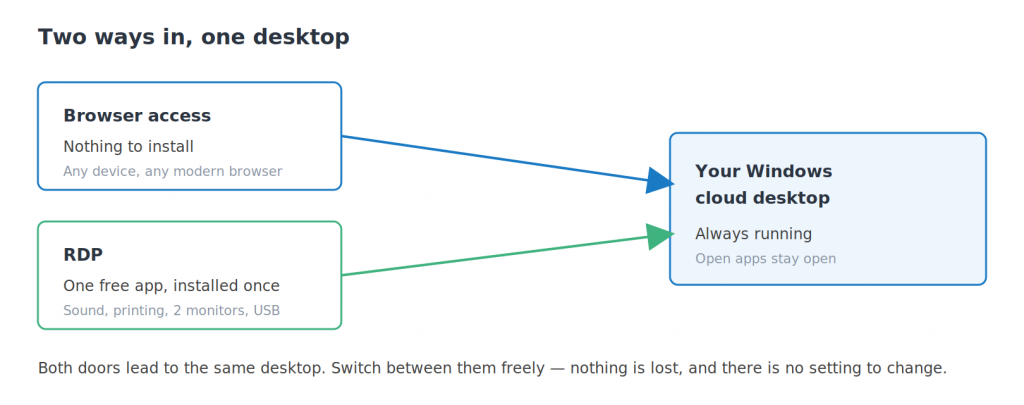
Short answer: disconnecting leaves everything running — your applications and documents stay exactly as they were. Signing out closes your programs and ends the Windows session. Neither shuts the machine down. For everyday use, just disconnect.
Applies to: browser access and RDP · all devices
A cloud desktop is not like closing a laptop lid. Your desktop runs on a server that stays on whether or not anyone is looking at it, which is exactly what makes it useful — but it does mean the difference between disconnecting and signing out is worth understanding.
Disconnect: the one you want most days
Disconnecting closes your view of the desktop and leaves the desktop itself running. Every application stays open, every document stays where it was, and anything long-running carries on.
Reconnect an hour later, or from a different device, and you are looking at the same screen you left. Closing the browser tab or the Remote Desktop window does the same thing.
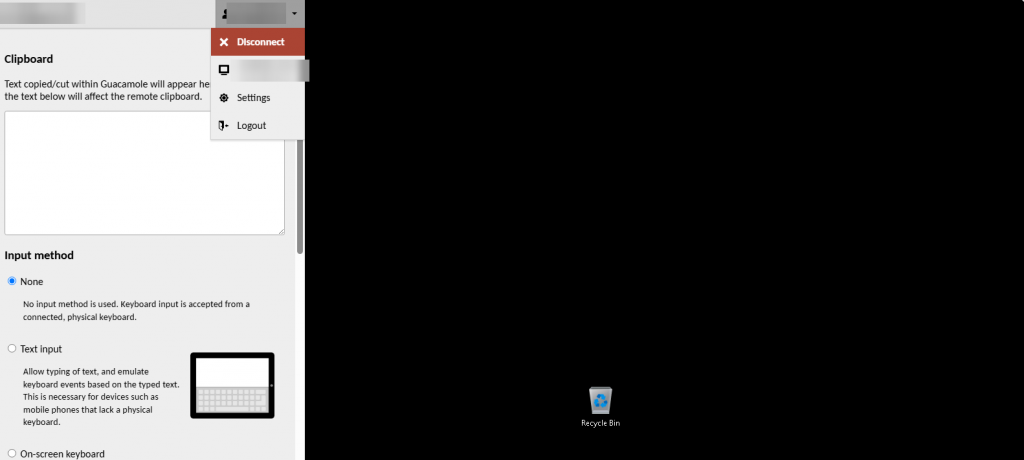
In a browser session, Disconnect sits in the account menu at the top of the control menu.
Sign out: a clean slate
Signing out inside Windows — the Start menu, then Sign out — closes your applications and ends the Windows session properly. Anything unsaved is lost, as it would be on any computer.
Worth doing when something is misbehaving and you want a fresh session, when you have finished a piece of work and want everything closed, or when you are on a shared or public computer.
Logout is a third thing
In a browser session, Logout signs you out of the web portal rather than out of Windows. Your desktop keeps running exactly as it was. It is the right choice when finishing on a borrowed computer.
Does my desktop keep running when I am away?
Yes. That is the point. Downloads finish, scheduled tasks fire, long jobs complete, and applications stay open — all while your own laptop is shut.
It also means you should treat it like a computer that is always on: keep it updated, use a strong password, and lock or sign out when you are working somewhere public.
Questions and answers
What is the difference between disconnect and sign out?
Disconnecting closes your view and leaves everything running, so you can pick up where you left off. Signing out closes your applications and ends the Windows session, losing anything unsaved.
Does closing the browser tab log me out?
No. It disconnects you. Your desktop keeps running with everything open, and reconnecting brings you straight back to it.
Will my downloads finish if I disconnect?
Yes. The desktop keeps working whether or not you are connected, so downloads, updates and long-running tasks all carry on.
Does disconnecting shut the machine down?
No, and neither does signing out. The machine only stops if you restart it from the control panel or shut it down from inside Windows.
Am I charged differently if I stay connected?
No. Your plan covers the desktop itself, which runs continuously. Connecting and disconnecting makes no difference to what you pay.
What should I do on a public or borrowed computer?
Sign out of the web portal with Logout, and close the browser. Nothing is left installed, and your desktop keeps running for next time.
My session is frozen. Should I sign out or restart?
Try disconnecting and reconnecting first — that clears most problems. If the desktop still will not respond, restart it from your control panel, which takes up to about ten minutes.
Related articles
- The hidden menu: press Ctrl+Alt+Shift in your browser session
- RDP will not connect: how to fix it
- Browser access or RDP: which should you use?
Something not behaving as described?
Open a support request from your control panel — that is the fastest route, because it reaches the team who can already see your account. You can also email [email protected].