

Short answer: Put your files in a folder such as C:\inetpub\sites\example, open IIS Manager, right-click Sites → Add Website, give it a name, that physical path, and a host name of your domain. Point the domain’s DNS A record at your VPS IP address and it is live.
Applies to: Infosaic VPS · Windows Server · IIS
This is the most-asked VPS question, and it is genuinely a five-minute job once you have done it once. The part that trips people up is not IIS — it is the relationship between the host name in the binding and the DNS record for the domain. Get those two agreeing and everything else follows.
Before you start

- IIS must be installed. If there is no Internet Information Services (IIS) Manager in the Start menu, add the Web Server (IIS) role through Server Manager, or ask us to.
- Know your VPS IP address. It is in Account Summary in the control panel.
- Have access to your domain’s DNS, wherever the domain is registered.
- Have your site files ready — at minimum an
index.htmlso you can tell it is working.
How to add a website in IIS
Two screens do the whole job: the tree in IIS Manager, and the Add Website dialog that opens from it.
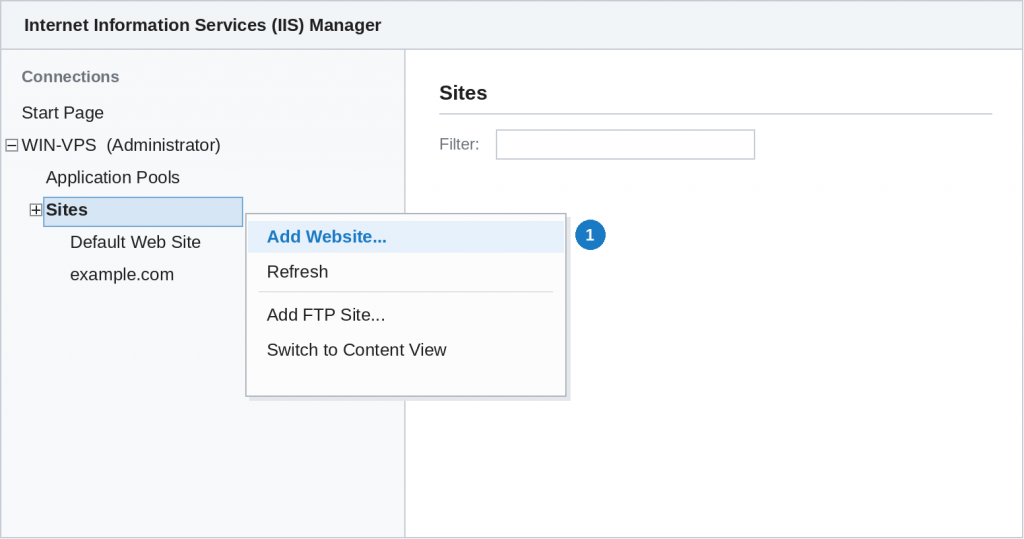
In IIS Manager, right-click Sites in the Connections tree on the left and choose Add Website…
- Create a folder for the site, for example
C:\inetpub\sites\example, and copy your files into it. Give each site its own folder — never point two sites at the same one. - Open IIS Manager from the Start menu or from Server Manager under Tools.
- In the tree on the left, right-click Sites and choose Add Website.
- Site name: anything memorable, such as example.com. It is only a label in IIS.
- Physical path: browse to the folder you created.
- Binding: type http, IP address All Unassigned, port 80, and Host name =
example.com. The host name is what lets one server run many sites on one IP address. - Click OK. The site starts immediately.
- Add a second binding for
www.example.com— select the site, click Bindings, Add, and repeat with the www host name. People type both.
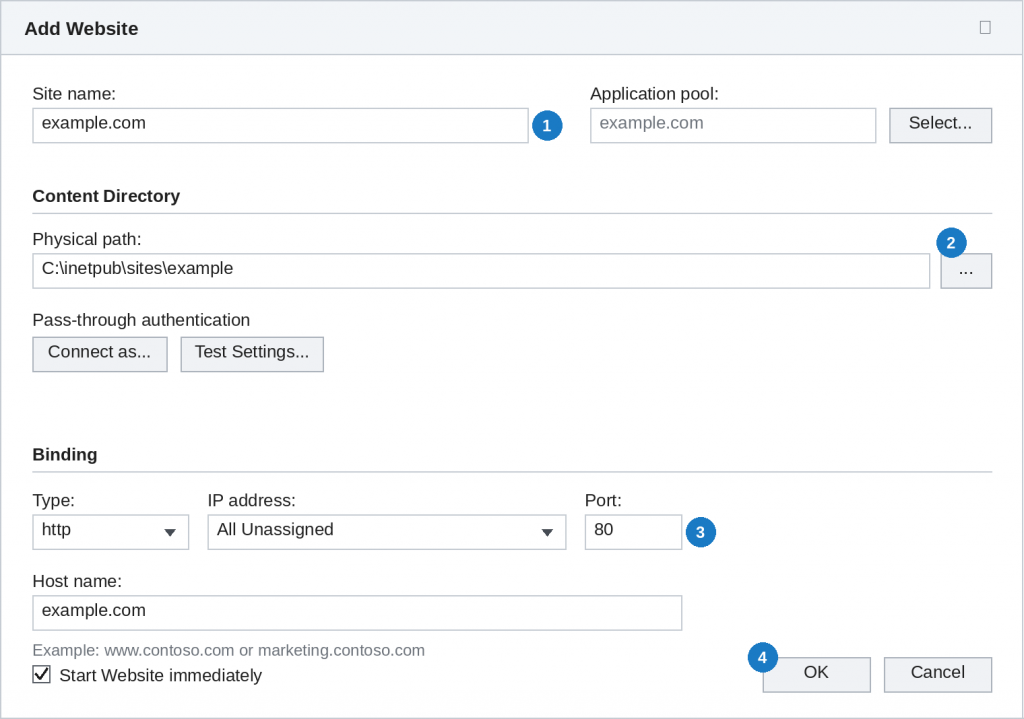
The Add Website dialog. Only three things need your attention: 1 the site name, 2 the physical path, and 3 the binding — then 4 OK. The application pool is created for you.
An application pool is created automatically with the same name. You do not need to touch it to get started.
Pointing your domain at the server

IIS now answers for that host name, but nothing on the internet knows to send traffic to your server yet. That is DNS.
- Sign in wherever the domain’s DNS is managed.
- Create an A record for
@(the bare domain) pointing to your VPS IP address. - Create a second A record for
wwwpointing to the same address, or a CNAME to the bare domain. - Wait for it to propagate — usually minutes, occasionally a few hours.
To test before DNS is ready, add a line to C:\Windows\System32\drivers\etc\hosts on your own computer mapping the VPS IP to the domain. That proves the IIS side works without waiting.
Add HTTPS as soon as it works on HTTP. Browsers mark plain HTTP sites as not secure, and visitors notice. Once the site loads, install a certificate and add a binding on port 443 — see adding an SSL certificate in IIS.
If the site does not load
- Test on the server first. Open a browser on the VPS and visit
http://localhost. If that fails, the problem is IIS, not DNS or the firewall. - Check the Windows Firewall allows inbound port 80 and 443.
- 403 Forbidden — usually no default document. Add an
index.html, or set the default document in IIS. - 404 on every page — the physical path is wrong, or the files are one folder deeper than you think.
- 500 errors — usually an application configuration problem. Turn on detailed errors temporarily to see the cause.
- The wrong site appears — two sites share a binding, or one has no host name and is catching everything.
- Permissions — the application pool identity needs read access to the site folder.
Questions and answers
How do I add a website to IIS?
Put the files in their own folder, open IIS Manager, right-click Sites and choose Add Website, then set the site name, physical path and a binding with your domain as the host name.
Where should I put my website files?
In a folder of their own, such as C:\inetpub\sites\example. Never point two sites at the same folder.
What is the host name in the binding for?
It lets one server with one IP address serve many different websites, by matching the domain the visitor typed.
Do I need a separate IP address for each site?
No. Host name bindings mean many sites share one IP address. Separate addresses are only needed in unusual cases.
How do I point my domain at the VPS?
Create an A record for the bare domain pointing at your VPS IP address, and a second A record or CNAME for www.
Can I test before DNS has propagated?
Yes. Add an entry to the hosts file on your own computer mapping the VPS IP to the domain name.
Why do I get 403 Forbidden?
Usually there is no default document in the folder. Add an index.html or configure the default document list in IIS.
Do I need to configure the application pool?
Not to get started. IIS creates one automatically with the site, and the defaults work for static sites and most applications.
Related articles
- What is a VPS, and how is it different from a cloud desktop?
- How to add an SSL certificate in IIS
- How to install software on your cloud desktop
- How to open a support request (and get it solved faster)
Still stuck?
Open a support request from your control panel with the domain name and the exact error — that is the fastest route, because it reaches the team who can already see your server. You can also email [email protected].